ESP-IDF Workflow
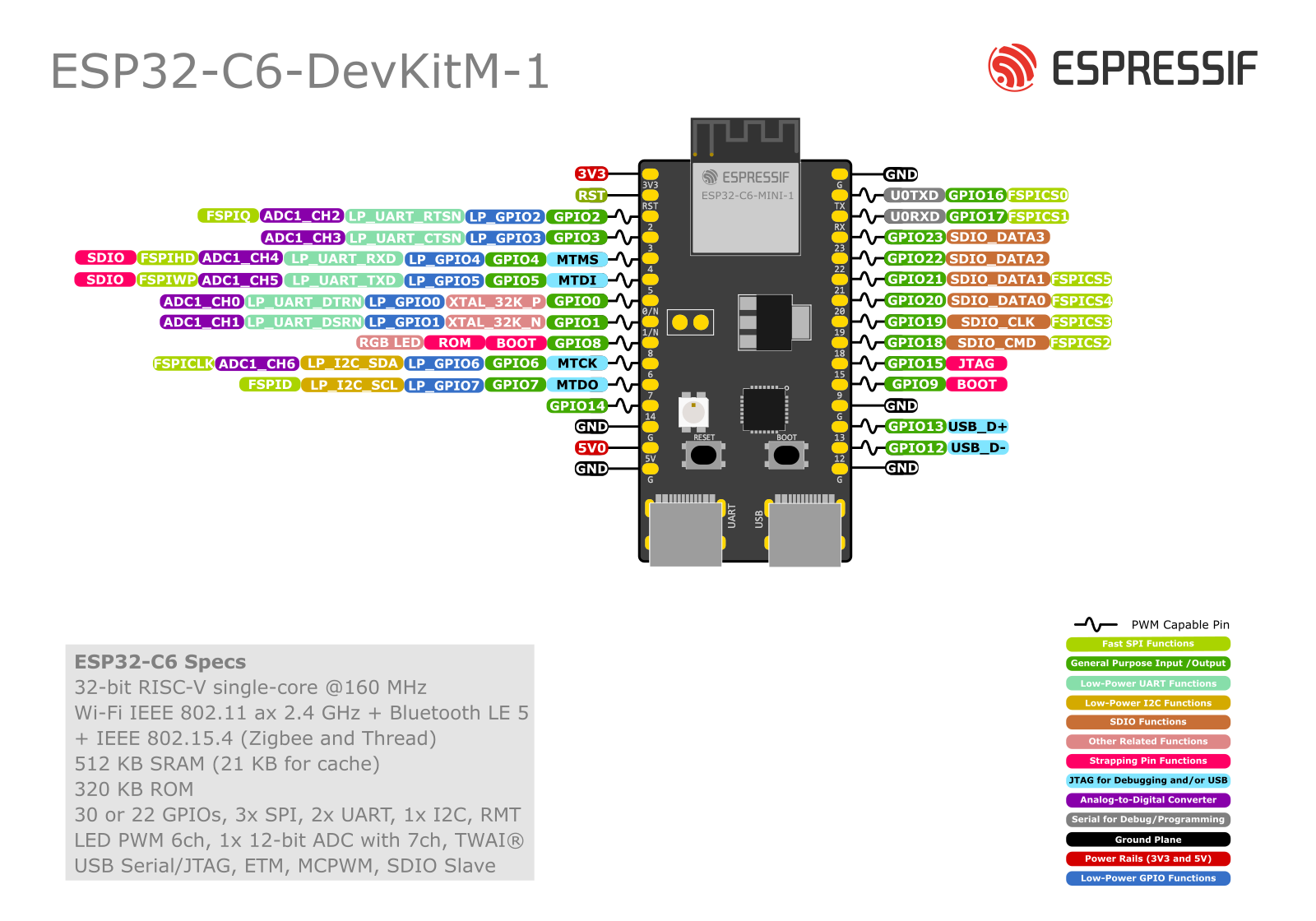
Context
| Feature | ESP32-C6 | RP2040 | Why it matters in this course |
|---|---|---|---|
| CPU | 32-bit RISC-V (single core) | Dual-core Arm Cortex-M0+ | C6 targets wireless + low-power IoT; RP2040 targets deterministic MCU tasks |
| Wi-Fi | Yes (2.4 GHz) | No | Course focus includes HTTP/MQTT and security |
| Bluetooth LE | Yes (BLE 5) | No | We will do GATT/advertising + mobile interaction |
| Zigbee / Thread | Yes (802.15.4 radio) | No | Enables Zigbee/Thread and path to Matter |
| Matter | Feasible on C6 (via Thread/Wi-Fi stacks) | Not natively | Final project: multiprotocol gateway/IIoT |
| USB | USB Serial/JTAG (device) on many C6 DevKits | USB device support depends on board/SDK; common via PIO/SDK | Impacts flashing, logging, and debugging experience |
| PIO (Programmable I/O) | No direct equivalent | Yes (PIO is a signature feature) | RP2040 shines for custom waveforms/protocol emulation |
| Low-power IoT | Strong deep-sleep + radio power mgmt | Low-power possible but no radio | Our labs emphasize deep sleep + secure comms |
| Ecosystem | ESP-IDF, Espressif stacks | Pico SDK / Arduino / RTOS options | We standardize on ESP-IDF for professional IoT workflows |
- Choose ESP32-C6 when you need: Wi-Fi, BLE, Zigbee/Thread, Matter path, and integrated security + provisioning.
- Choose RP2040 when you need: tight timing, PIO-based custom protocols, or as a co-processor for specialized I/O.
Toolchain Philosophy: Why ESP-IDF
ESP-IDF is Espressif’s official framework: - Native access to Wi-Fi/BLE/802.15.4 stacks, FreeRTOS, NVS, security primitives. - Production-grade build system (CMake + Ninja), component model, menu configuration, and logging. - Better alignment with debugging, provisioning, certificates, OTA, and power management.
ESP-IDF Workflow
Repository Layout (Recommended)
project-root/
├── README.md
├── CMakeLists.txt
├── sdkconfig.defaults
├── main/
│   ├── CMakeLists.txt
│   └── app_main.c
├── components/
│   └── my_driver/
│       ├── CMakeLists.txt
│       ├── include/
│       └── my_driver.c
└── docs/
    └── logbook.md
Core Commands
From the project root:
- Set target (once per project)
- Set target (once per project)
idf.py set-target esp32c6- Configure (as needed)
idf.py menuconfig- Build
idf.py build- Flash
idf.py -p PORT flash- Example:
idf.py -p /dev/ttyACM0 flash - Monitor logs
idf.py -p PORT monitor- Tip: You can combine them:
idf.py -p PORT flash monitor
USB on ESP32-C6: What You Need to Know
USB-Serial/JTAG vs “Classic UART”
Many ESP32-C6 DevKits expose a USB port that supports: - USB Serial (console logging / flashing) - USB JTAG (debugging)
This differs from classic external USB-to-UART bridges (CP2102/CH340) used on older boards.
Practical impact
- The same USB cable can provide flashing + logs + debugging (board dependent).
- Port enumeration can change between OSes—document your <PORT>.
If flashing works but monitoring doesn’t (or vice versa), verify: - Correct port selected - Menuconfig USB console settings (project-dependent) - Cable quality (data vs charge-only)
Networking & Security Implications
Wi-Fi (HTTP/MQTT)
You will implement: - Station + Access Point basics - HTTP client/server patterns - MQTT pub/sub with authentication - TLS fundamentals (certs, time, root CA)
BLE
You will implement: - Advertising vs connections - GATT services/characteristics - Mobile interaction testing (e.g., generic BLE scanner apps) - Security modes and pairing considerations
Zigbee/Thread → Matter
You will explore: - 802.15.4 fundamentals (channels, PAN IDs) - Thread concepts (mesh, border router role) - Matter at a high level (commissioning, multi-admin, device models)