RTOS Introduction
Hard vs Soft Real-Time
- Hard real-time: Missing a deadline is a system failure (e.g., airbag deployment).
- Soft real-time: Deadlines matter, but occasional misses degrade performance rather than cause failure (e.g., audio buffering).
Overview of Programming Models
Embedded systems programming often uses two main models.
Superloop Definition
A superloop is a common bare-metal firmware structure where the program runs an infinite while(1) loop (“main loop”). It repeatedly calls functions to handle tasks—like reading inputs, updating outputs, and running state machines—often using interrupts to handle urgent events.
RTOS Definition
A Real-Time Operating System (RTOS) is a lightweight operating system designed to run applications where timing matters. Unlike general-purpose OSes (PC/phone), an RTOS focuses on predictable response times so the system can react to events within known deadlines.
Comparison: Superloop vs. RTOS
| Feature | Superloop | RTOS |
|---|---|---|
| Execution Model | One main loop runs everything in a fixed/semi-fixed order. | Multiple tasks/threads run under a scheduler (priority-based). |
| Responsiveness | Depends on loop length; long operations delay everything. | High; priorities and preemption ensure urgent tasks run quickly. |
| Complexity | Simple to start; gets messy as features grow (flags, spaghetti code). | Higher upfront complexity; scales better for large systems. |
| Determinism | Deterministic if strictly timed (no blocking) and ISRs are bounded. | Supports deterministic behavior when ISR time, priorities, and shared resources are engineered correctly. |
| Resource Usage | Minimal overhead (fewer stacks, no scheduler). | Higher RAM/Flash usage (task stacks, TCBs, context switching). |
| Synchronization | Manual (globals, flags, ring buffers). | Built-in primitives (Queues, Semaphores, Mutexes). |
| Best Fit | Small/simple products, tight memory constraints. | Complex systems, multiple concurrent protocols, modular design. |
Why use an RTOS?
In embedded systems, you often need to handle multiple things “at once,” such as: * Reading sensors * Driving motors or actuators * Managing communication (UART/I2C/SPI/CAN/Ethernet) * Updating a UI or logging data
An RTOS helps you structure this cleanly by splitting work into Tasks and letting the scheduler decide who runs when.
Engineering judgement: If a system is small, timing is simple, and RAM is tight, a well-structured superloop may be the better choice.
Core Ideas of an RTOS
1. Tasks (Threads)
Independent functions that run “concurrently” via scheduling.
* Note: Time slicing (round-robin) is typically optional and usually applies only among tasks of equal priority when enabled.
* Example:
* SensorTask: reads IMU every 10 ms
* ControlTask: runs PID at 1 kHz
* CommsTask: sends telemetry at 50 Hz
2. Scheduler
The kernel component that chooses the next task to run, usually based on priority.
* Example:
* ControlTask has higher priority than LoggingTask.
* If ControlTask becomes ready, it can preempt LoggingTask immediately (in a preemptive configuration).
Timing note: Real-time behavior depends on tick rate, ISR latency, and how long interrupts/critical sections block scheduling.
3. Context Switch
The action of saving the current task’s CPU state (registers, stack pointer) and restoring another’s so the CPU can run a different task. * Example: * A low-priority task is running. An interrupt wakes a high-priority task → the RTOS saves the low-priority context and switches to the high-priority one.
4. Blocking vs. Non-blocking
Tasks can wait (block) for events/resources or run without waiting.
* Example:
* SensorTask blocks (sleeps) for ~10 ms using vTaskDelay(pdMS_TO_TICKS(10)) (tick rate dependent).
* CommsTask runs periodically to check a buffer (polling).
Design pitfall: A high-priority task that never blocks/yields can starve lower-priority work.
5. Inter-task Communication (Queues)
Thread-safe mechanisms to pass data between tasks, typically in FIFO order.
* Example: SensorTask sends measurements to ControlTask via a queue.
* Producer: Puts {temp, accel, gyro} into queue.
* Consumer: Pops the next sample in FIFO order.
“Latest value” pattern: If you want the consumer to always use the most recent value (not FIFO history), consider a length-1 queue with overwrite, a shared struct + mutex, or task notifications (depending on your RTOS).
6. Semaphores & Mutexes
Synchronization objects used to signal events or manage access to limited resources.
- Binary Semaphore: Signals "something happened" (0/1).
- Example: An ISR gives a semaphore when a UART packet arrives;
CommsTasktakes it to process data.
(FreeRTOS pattern:xSemaphoreGiveFromISR()in ISR,xSemaphoreTake()in task.)
- Example: An ISR gives a semaphore when a UART packet arrives;
- Counting Semaphore: Tracks multiple identical resources.
- Example: Counting slots in a buffer pool.
- Mutex: Protects a shared resource (like an I2C bus) from being accessed by two tasks simultaneously.
- Note: Many RTOSes (including FreeRTOS) support priority inheritance with mutexes, helping reduce priority inversion.
Task States
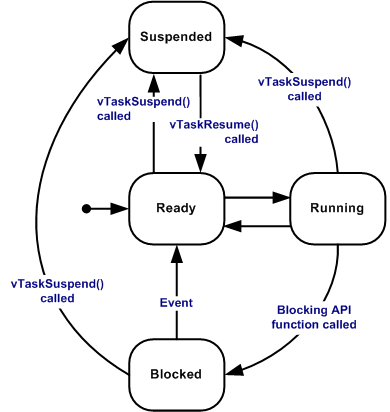
At any given time, a task is in one of the following states:
-
Running
- Definition: The task is currently executing on the CPU.
- Example:
ControlTaskis calculating PWM duty cycle.
-
Ready
- Definition: The task is able to run immediately but is waiting for the CPU (because another Ready task is currently running—often a higher priority task, or a same-priority task depending on time slicing).
- Example:
CommsTaskhas data to send, butControlTaskis currently using the CPU.
-
Blocked
- Definition: The task is waiting for an event (time, data, semaphore) and cannot run until that event occurs.
- Example:
SensorTaskis sleeping for ~10 ms viavTaskDelay(pdMS_TO_TICKS(10)).
-
Suspended
- Definition: Explicitly taken out of scheduling; will not run until explicitly resumed.
- Example:
LoggingTaskis suspended to prevent flash writes during a critical motor startup phase.
-
Deleted
- Definition: The task has been removed from the kernel; its resources are freed.
Scheduling and Priorities
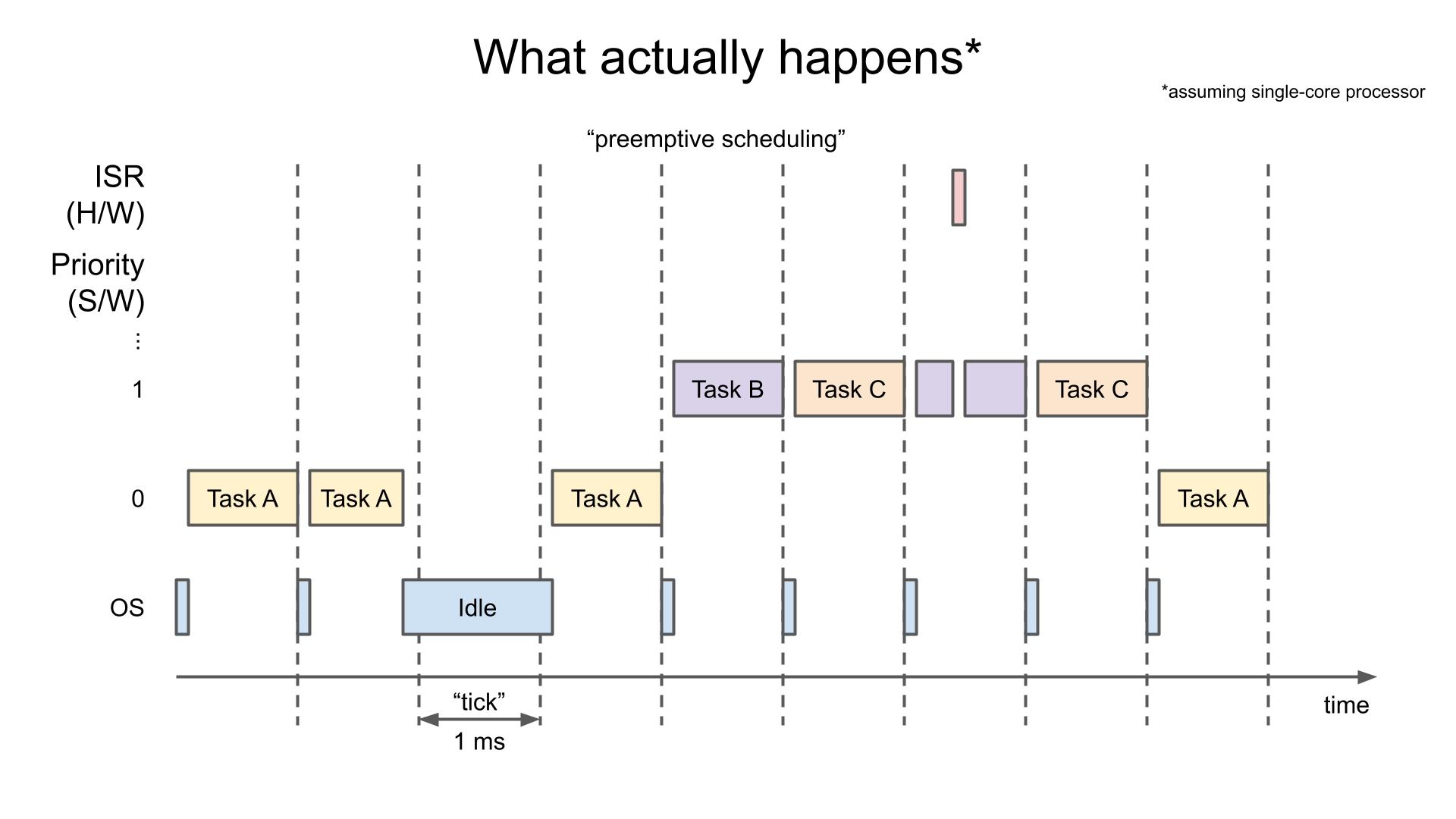
The scheduler decides which Ready task runs. Most embedded RTOSes use Preemptive Priority-Based Scheduling:
Rule: The highest-priority Ready task always runs. Lower-priority tasks run only when higher ones are Blocked, Suspended, or Deleted.
If multiple tasks share the highest Ready priority, the scheduler selects among them (often round-robin if time slicing is enabled).
Preemptive vs. Cooperative
- Preemptive (Standard): A high-priority task can interrupt a low-priority task immediately when it becomes Ready.
- Cooperative: Tasks run until they voluntarily yield or block. Simpler, but easier to hang the system.
How to Choose Priorities
Assign priorities based on deadline strictness and failure consequences:
- High (Safety / Hard Deadlines): Motor control, protection loops, watchdog checks.
- Medium-High (Real-time I/O): Draining UART/SPI buffers, handling packets.
- Medium (App Logic): Parsing, decision making, state machines.
- Low (Background): Logging, UI updates, debug printing.
Activities
Exercise Objective
The goal of this exercise is to train you to identify logical FreeRTOS tasks from system behavior, even when no RTOS code is shown.
You should focus on:
- Timing requirements
- Blocking behavior
- Safety and criticality
- Independent execution flows
Think in terms of "what must happen independently", not functions or lines of code.
System Description
You are given the following description of an embedded system:
The system:
- Reads a temperature sensor every 50 ms
- Sends sensor data via Wi-Fi every 2 seconds
- Monitors an emergency button continuously
- Blinks a status LED at 1 Hz
- Stores error messages when failures occur
Assume:
- The system runs on a microcontroller
- Timing matters
- Some operations may block (Wi-Fi, storage)
Exercise 1 — Identify Logical Tasks
List the logical tasks that exist in this system.
Do not think about code yet — think about behavior.
| Task Name (Your Choice) | Trigger (Time / Event) | Periodic or Event-Based |
|---|---|---|
Exercise 2 — Task Characteristics
For each task you identified, answer the following:
- Is it time-critical? (Yes / No)
- Can it block safely? (Yes / No)
- What happens if this task is delayed?
Write short, technical answers.
Exercise 3 — Priority Reasoning
Assign a relative priority to each task:
- High
- Medium
- Low
Then justify each choice in one sentence.
| Task Name | Priority (H/M/L) | Justification |
|---|---|---|
Exercise 4 — Design Judgment (Trick Question)
Which of the following should NOT necessarily be implemented as a FreeRTOS task?
- Emergency button monitoring
- Wi-Fi transmission
- Error logging
- Status LED blinking
Explain why in 2–3 sentences.
Exercise 5 — Identifying Hidden Tasks in Pseudo-Code
The following pseudo-code represents a single-loop embedded program written without an RTOS.
while (1) {
    read_temperature_sensor();          // takes ~2 ms

    if (button_pressed()) {
        emergency_shutdown();            // must react immediately
    }

    if (time_since_last_send() > 2000) {
        send_data_over_wifi();            // may block for 100–300 ms
    }

    toggle_status_led();                 // 1 Hz blink rate

    delay_ms(10);
}
Task 5.1 — Identify Hidden Tasks
Even though this code uses a single while(1) loop, multiple logical tasks are hidden inside it.
List the tasks you can identify.
| Hidden Task | Trigger (Time / Event) | Why it should be a Task |
|---|---|---|
Task 5.2 — Blocking Analysis
Answer the following:
- Which function can block the CPU?
- What other behaviors are affected while it blocks?
- Which hidden task is most at risk because of this blocking?
Task 5.3 — RTOS Refactoring Thought Experiment
Without writing code:
- Which hidden task(s) should become FreeRTOS tasks?
- Which behavior(s) should be handled using an interrupt?
- Which task should have the highest priority, and why?
Write short, technical justifications.
Submission Instructions
- Complete individually
- Be prepared to justify your answers orally
- No single correct solution — logic and justification matter